Tungs app icon
TungsCOMMUNICATION · BY MANIFEST

Speak your language. They hear theirs.

Real-time speech translation for your calls in Zoom, Google Meet, Teams or any other call app, on Mac and Windows. Both directions at once.
Download for Mac Download for Windows First 10 minutes free. No account, no card.
macOS 14 or laterWindows 11 tungs.ai ↗
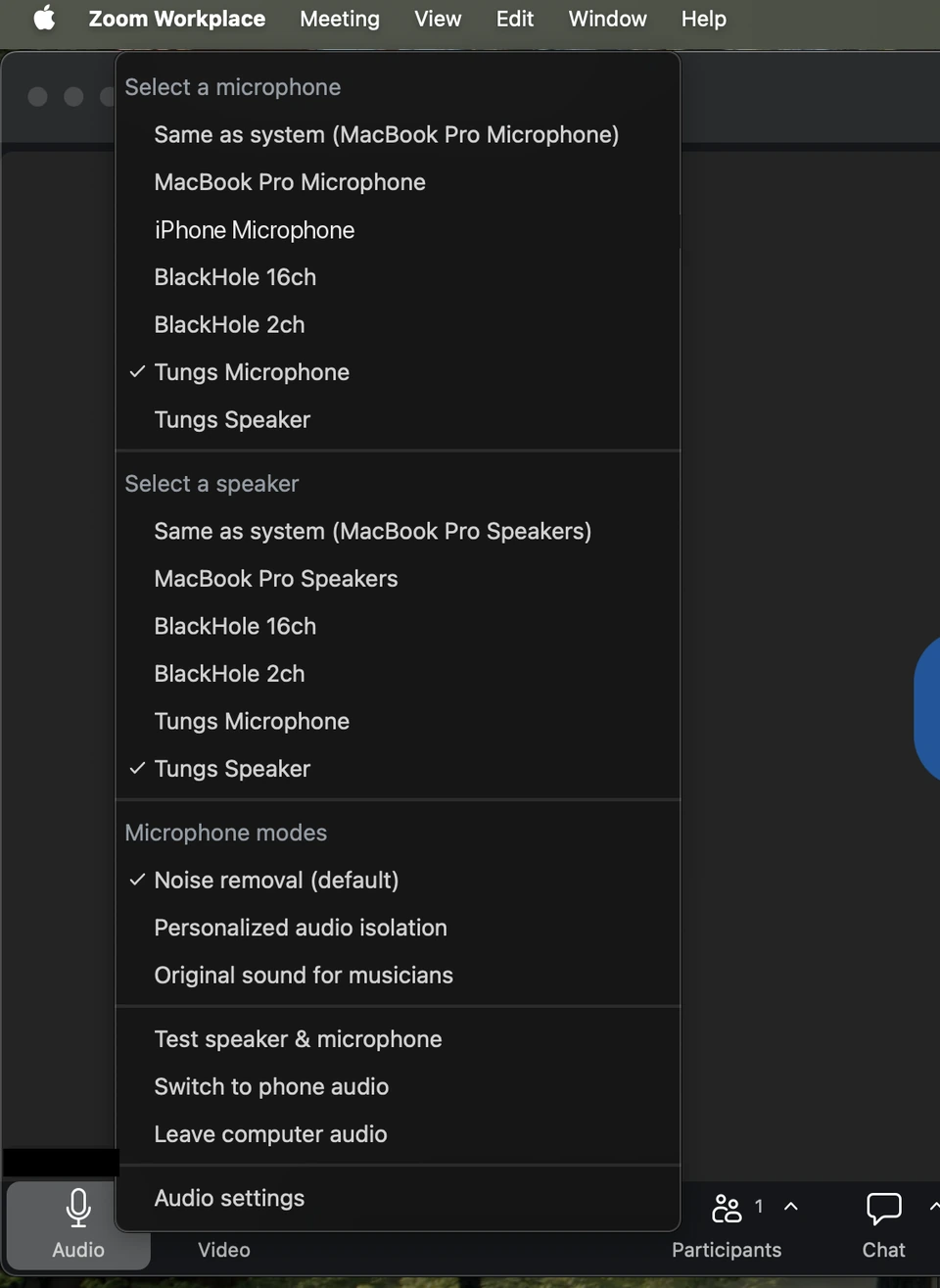
The Zoom audio menu on a Mac, with Tungs Microphone and Tungs Speaker selected
Tungs shows up in the list like any other microphone and speaker.
13languages
Both waysat the same time, no turn-taking
Any call appthe other person installs nothing
10 minfree to try, no sign-up

How it works

Set it up once. Then talk normally.

Installing Tungs adds two audio devices to your computer, Tungs Microphone and Tungs Speaker. Tungs never joins the call: no bot, nothing in the participant list, no meeting permission.

How Tungs works ↗
EnglishEspañol
STEP 1

Set your two languages

Install Tungs on your Mac or Windows PC. Pick your language and theirs, then the microphone and headphones you use.

Tungs Microphone Tungs Speaker
STEP 2

Choose Tungs in your call app

In Zoom, Meet, Teams or FaceTime, set the microphone and speaker to Tungs.

YouThem
STEP 3

Talk normally

You speak yours, they hear theirs, and back again. Both directions at once, with no turn-taking.

Works with

Any app that lets you pick a microphone and speaker.

ZoomGoogle MeetMicrosoft TeamsWebexFaceTimeWhatsAppDiscordTelegramSignalSlackViber

Only you install Tungs. The other person needs nothing.

13 languages

All 13 work in both directions.

EnglishSpanishPortugueseFrenchGermanItalianJapaneseKoreanChineseRussianHindiIndonesianVietnamese

The spoken language is detected automatically.

What people use it for

Any call where the two of you do not share a language.

Family abroadPartners and in-lawsDistributed teamsSales and supportHiringContractors and suppliers

Privacy and pricing

What happens to your audio, and what it costs.

Call audio is never stored.

Translated as it passes throughYour call audio is not written to disk and not kept in a database.
No transcripts, no trainingTranscripts are not stored, and nothing you say is used to train any model.
Recordings stay on your computerTungs records a call only when you turn recording on. The file stays in a folder on your own computer and is never uploaded.
Your own keyAny subscription can use your own OpenAI key instead of Tungs minutes. Then nothing is metered by Tungs, and your audio goes from your computer straight to OpenAI without reaching Tungs servers.
Read the privacy page ↗

Try it free. Then subscribe by the month or the year.

First 10 minutesFreeNo account, no card.
Monthly$19.99 a month120 call minutes every month, captions included. Cancel any time.
Yearly$199 a year$16.58 a month billed annually, 2 months free. The same 120 call minutes every month.
60 extra minutes$9.99For subscribers, bought in Tungs. Included minutes reset each month; extra minutes carry over.

Prices in US dollars. Local prices apply in the euro area, the UK, Mexico, Indonesia and Brazil.